I connected Rank Math to an AI assistant and gave it access to my WordPress SEO data.
Then I asked it to audit my website, find underperforming content, investigate internal links, inspect Schema, check redirects and 404s, review Rank Math settings, and analyse AI Visibility.
It found some problems I had overlooked.
It also produced recommendations that I would not blindly implement.
That second part turned out to be just as interesting as the first.
After running several tests with Rank Math MCP, I started seeing a clear pattern.
I have been using Rank Math for years, so my SEO workflow is fairly familiar:
- Check Google Search Console
- Look at impressions, clicks and rankings
- Find pages that deserve another look
- Review titles and meta descriptions
- Check internal links
- Inspect Schema
- Look for broken links and redirects
- Update older content
- Repeat
None of these tasks is particularly difficult.
The problem is the amount of investigation involved.
So when I started experimenting with Rank Math MCP, I wasn’t interested in another AI-generated SEO checklist.
I wanted to know something more practical:
Can an AI assistant actually help me investigate SEO problems on a real WordPress website when it has access to Rank Math?
And more importantly:
Where should I trust it, and where should my own SEO judgment take over?
So I gave it a real website.
The Experiment Setup
I wanted this to be a real-world test rather than a theoretical tutorial.
The website I used was EYNZone.com, a WordPress site with 21 posts and 16 pages, giving me 37 published posts/pages to investigate.
The core MCP tests were performed in September 2026.
| Test setup | Details |
|---|---|
| Website | EYNZone.com |
| Platform | WordPress |
| SEO plugin | Rank Math SEO |
| Rank Math versions | Free 1.0.279 + PRO 3.0.120 during the core tests |
| AI assistant | Claude + Grok |
| MCP connection | AcrossAI |
| Content analysed | 21 posts + 16 pages |
| Experiment period | September 2026 |
| Goal | Find out how effectively AI could investigate real SEO issues using Rank Math data |
One detail is worth mentioning for reproducibility: a later settings-only audit reported the connected Rank Math account as an Agency plan and identified PRO 3.0.122 as the latest available version. I am keeping that separate from the core MCP experiment, rather than mixing the two test states.
My rule was simple
AI could:
- investigate
- analyse
- find patterns
- explain findings
- suggest actions
But I would manually review anything that could materially change the website.
That rule became increasingly important as the experiment progressed.
What Is Rank Math MCP?
MCP stands for Model Context Protocol.
In simple terms, it provides a way for an AI assistant to communicate with external tools and data.
In this experiment, that meant the AI wasn’t working from a generic SEO description.
It could work with information from my actual WordPress website and Rank Math setup.
Depending on the available tools and configuration, that can include things such as:
- SEO settings
- SEO metadata
- Schema
- internal links
- external links
- redirects
- 404 information
- sitemap information
- robots.txt
- llms.txt
- site audits
- content information
- AI Visibility data
That’s a very different experience from asking an AI:
What are the best SEO practices for WordPress?
The AI now has context.
And context is what I wanted to test.
My Experiment: Give AI an SEO Job, Not an SEO Question
I deliberately changed how I interacted with AI.
Instead of asking:
How should I optimise my WordPress website?
I asked:
Look at my website and tell me what you find.
My workflow looked like this:
AI assistant → Rank Math MCP → Website data → Analysis → Recommendation → Human review → Action → Verification
I wasn’t testing whether AI could generate SEO advice.
I was testing whether it could investigate my SEO.
That distinction matters.
Test #1: “Audit My Website”
I started with the broadest possible test.
My prompt was:
Using Rank Math MCP, audit my website’s current SEO configuration. Look for important technical and on-page SEO issues. Do not change anything yet. Group the findings by severity and explain why each issue matters.
The AI returned a list of issues and attempted to prioritise them.
But I didn’t immediately start fixing everything.
Instead, I asked myself:
- Is this actually a problem?
- Is it relevant to this website?
- Is it supported by the underlying data?
- Is the suggested action appropriate?
- Would I make the same recommendation if I were auditing the site manually?
That last question became a recurring part of the experiment.
What the audit actually found
One of the clearest findings was a Schema gap.
The Rank Math audit reported:
- 33 of 37 published posts/pages missing Schema
- 11 pages/posts missing an SEO title
- 17 pages/posts missing a meta description
- 8 pages/posts with a low Rank Math SEO score
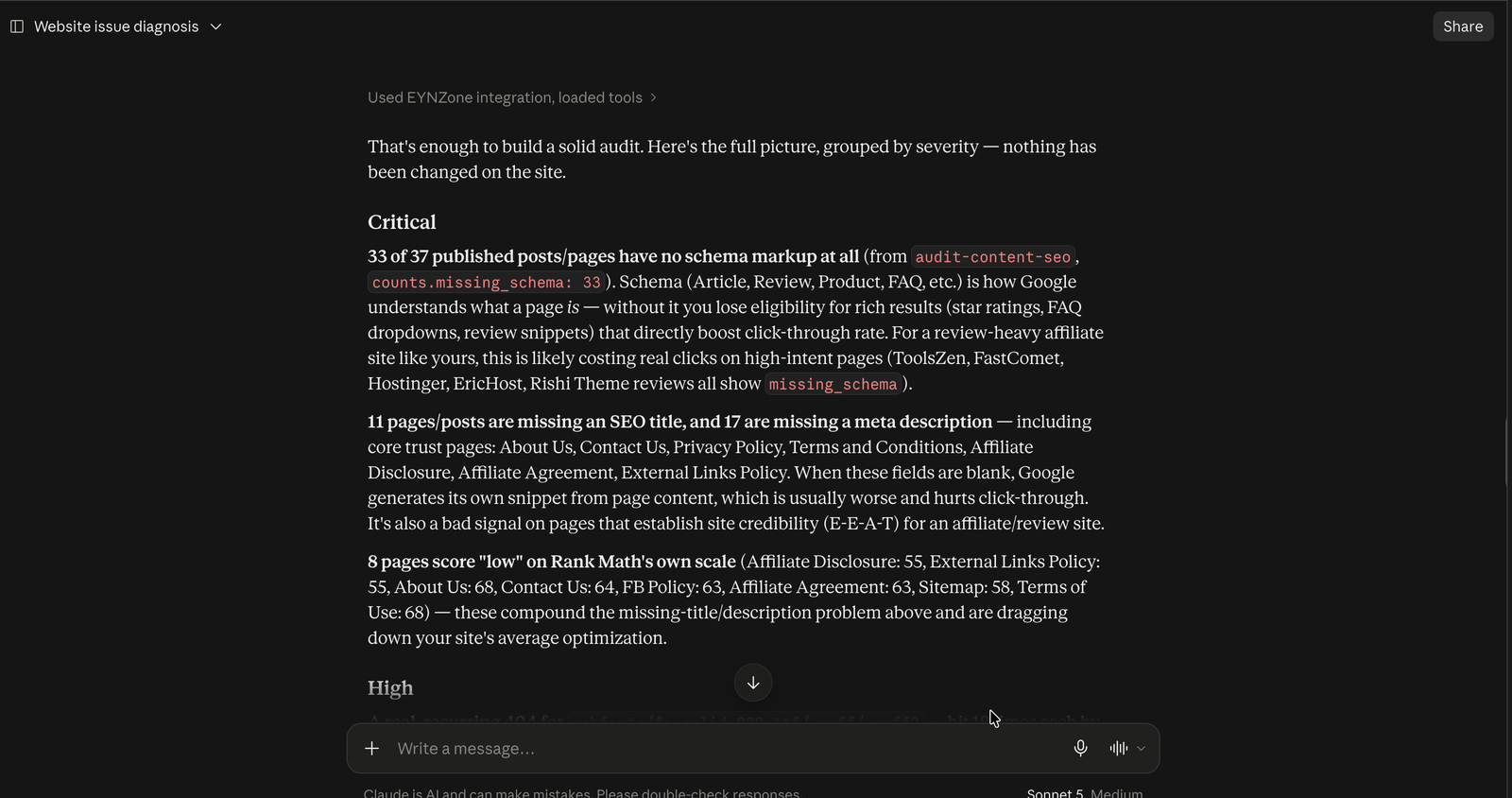
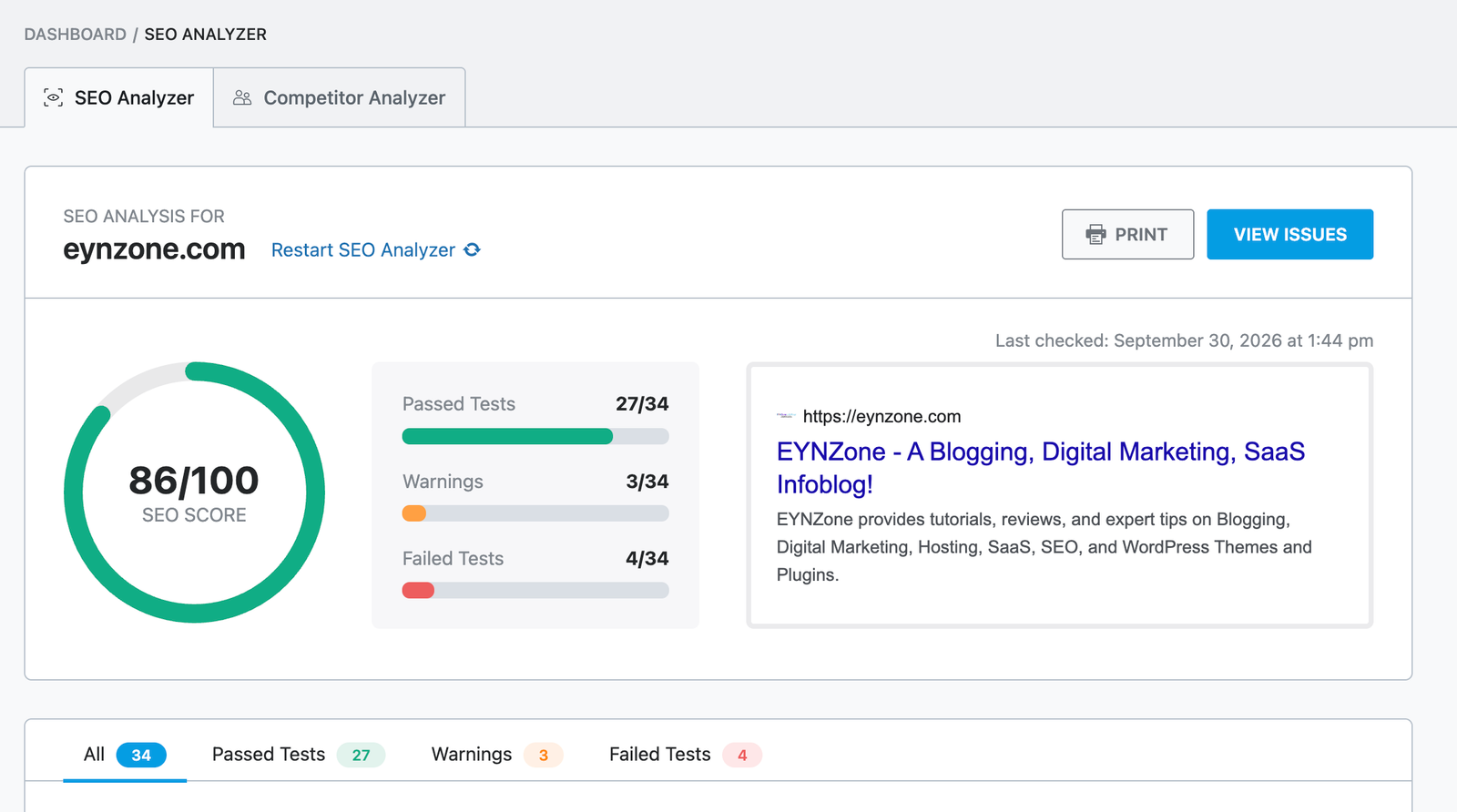
The missing metadata was particularly interesting because several affected pages were not random blog posts.
They included pages such as:
- About Us
- Contact Us
- Privacy Policy
- Terms and Conditions
- Affiliate Disclosure
- Affiliate Agreement
- External Links Policy
That changed how I looked at the problem.
If I simply followed the AI’s severity labels, I could end up spending time chasing dozens of warnings.
Instead, I started separating findings into:
Fix
Something with a clear technical or content problem.
Investigate
Something that may be a problem but needs more context.
Ignore for now
Something technically optimisable but unlikely to deserve immediate attention.
That’s an important distinction.
SEO isn’t about fixing the maximum number of warnings.
Sometimes the correct SEO decision is:
Don’t change it yet.
Test #2: I Let AI Find My Underperforming Content
This was one of the most useful tests because the AI could work with actual Search Console data.
I asked:
Look at my Search Console performance and identify pages with the strongest opportunity for improvement. Explain why you selected them.
The data covered the previous three months.
The top-level numbers were surprisingly stark:
3,907 impressions. 1 click. 0.03% CTR. Average position: 55.7.
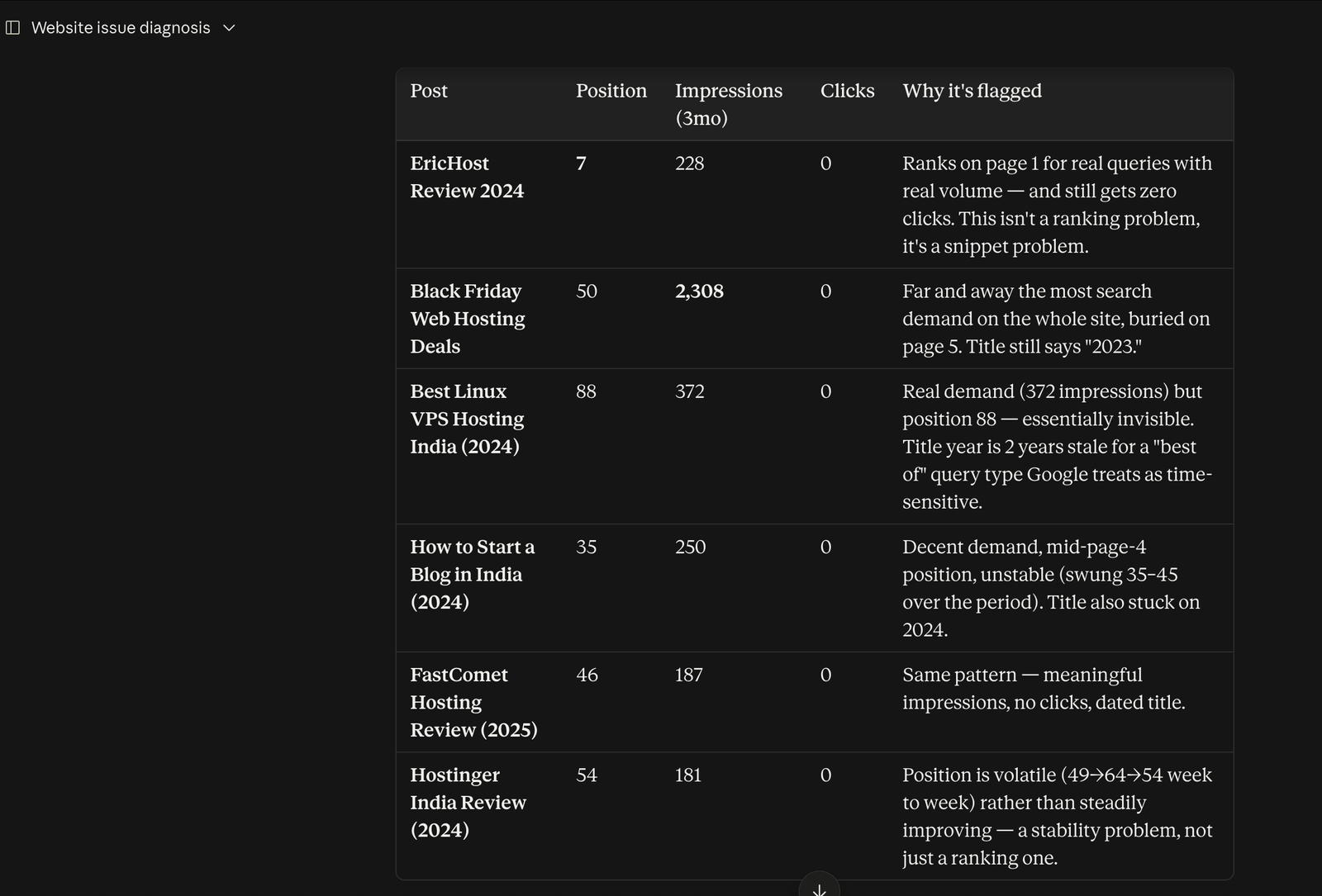
The data covered 15 tracked posts and 279 keywords.
The AI then surfaced several pages worth investigating.
| Page | Position | Impressions | Clicks |
|---|---|---|---|
| EricHost Review 2024 | 7 | 228 | 0 |
| Black Friday Web Hosting Deals | 50 | 2,308 | 0 |
| Best Linux VPS Hosting India (2024) | 88 | 372 | 0 |
| How to Start a Blog in India (2024) | 35 | 250 | 0 |
| FastComet Hosting Review (2025) | 46 | 187 | 0 |
| Hostinger India Review (2024) | 54 | 181 | 0 |
The most interesting example was EricHost Review.
It was sitting around position 7 and had 228 impressions, yet recorded zero clicks during the period.
That immediately changed the question.
It wasn’t simply:
How do I rank this page higher?
The more useful question was:
Why isn’t a page already appearing on page one getting clicks?
That requires looking at the SERP, title, description, search intent and competitors.
An AI can identify the anomaly.
It can’t automatically tell me the correct explanation.
Then there was Black Friday
The Black Friday Web Hosting Deals page generated 2,308 impressions, which was more than half of the site’s total impressions in this dataset.
But it was sitting around position 50.
And its title still referenced 2023.
That was a much clearer content-freshness problem.
The AI had found the opportunity.
My job was to understand why it mattered and what should actually be changed.
Test #3: I Asked AI to Investigate My Internal Links
Internal linking is one of those tasks that sounds simple until you actually audit a site.
Adding one link to a new article is easy.
Finding important older pages that have quietly become isolated is much harder.
So I asked:
Audit the internal linking structure of my website. Find important posts with poor internal linking and suggest which existing pages should link to them. Explain the relevance of each suggested connection.
The live internal-link graph produced one of the biggest surprises in the entire experiment.
Out of the site’s 37 published pages/posts, only 20 had any inbound internal link in the live scan.
That meant roughly half of the site’s content had no page pointing to it.
And this is where combining datasets became much more useful than looking at a single SEO metric.
The AI wasn’t simply showing me orphaned pages.
I could cross-reference them with Search Console data.
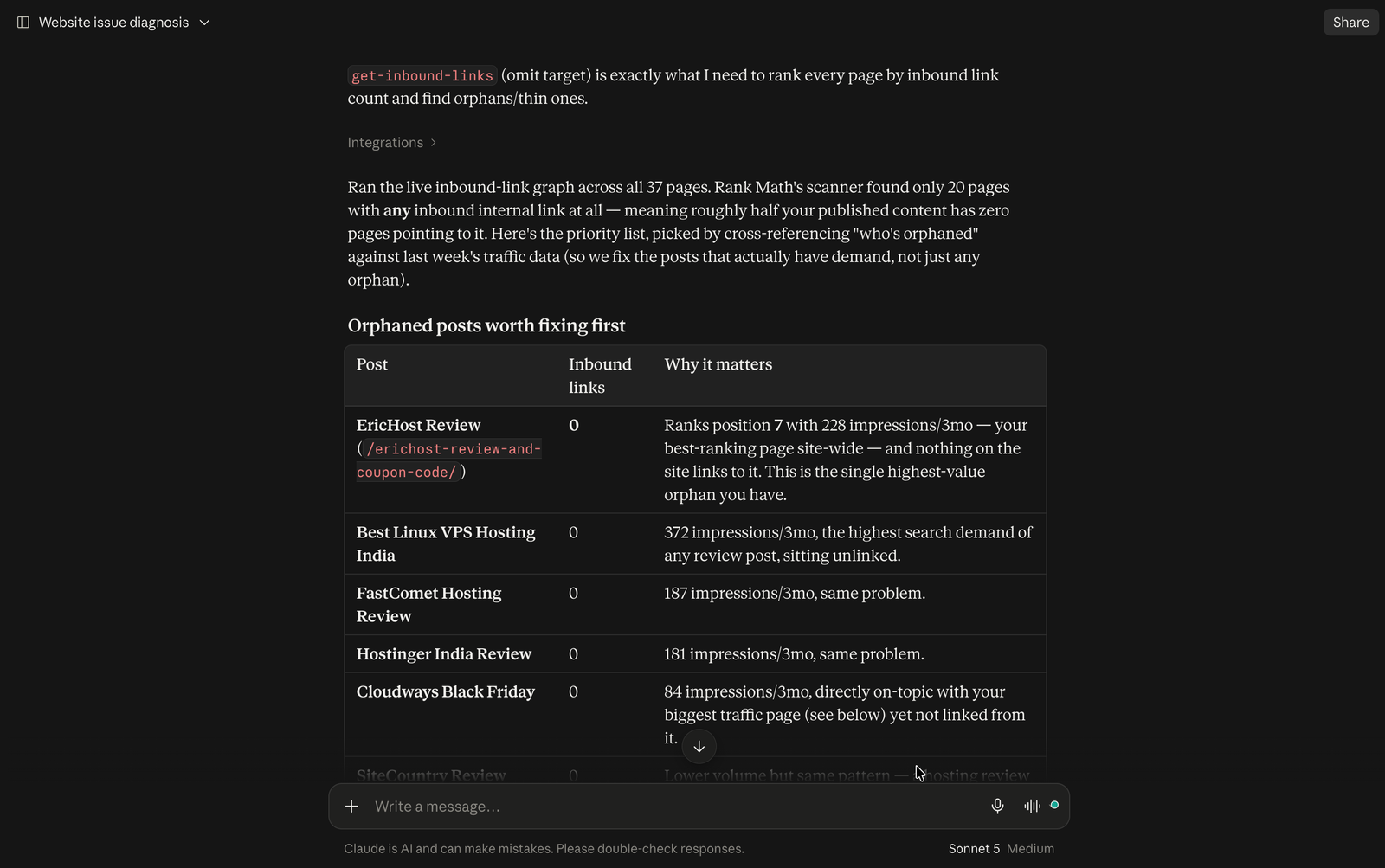
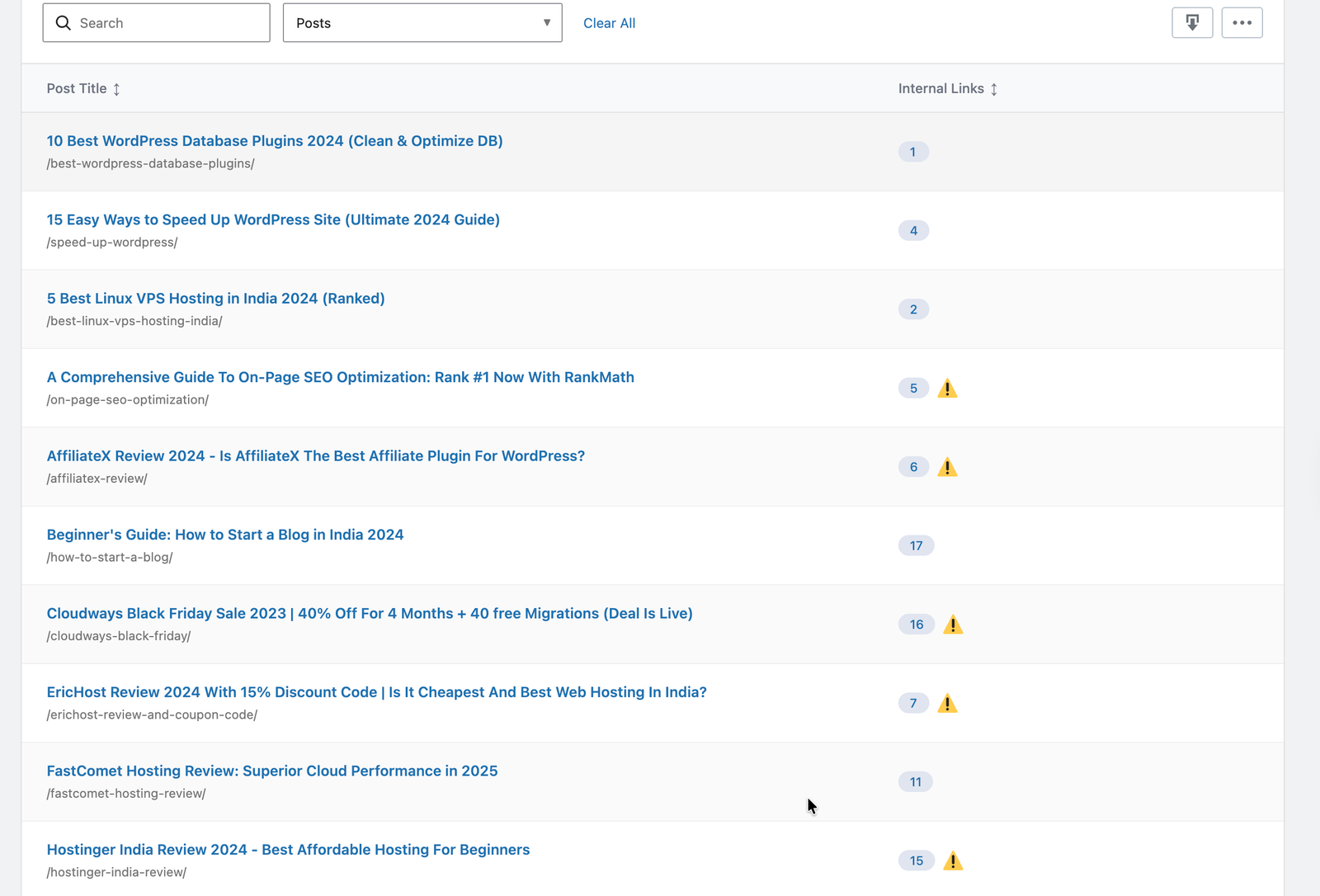
The orphaned pages that caught my attention
EricHost Review
0 inbound internal links
But it was ranking around position 7 with 228 impressions.
Best Linux VPS Hosting India
0 inbound internal links
372 impressions.
This Best Linux VPS Hosting India article was already getting search impressions, but no other page was linking to it internally.
FastComet Hosting Review
0 inbound internal links
187 impressions.
Hostinger India Review
0 inbound internal links
181 impressions.
Cloudways Black Friday
0 inbound internal links
84 impressions.
This was much more useful than a generic recommendation such as:
Add more internal links.
I could now ask:
Which pages deserve internal links because there is already evidence of search demand?
That is a much better SEO question.
The Black Friday page became especially interesting
The Black Friday Web Hosting Deals page had 2,308 impressions in the three-month Search Console dataset.
Yet it wasn’t functioning as the content hub I would expect from a page attracting that much search visibility.
The obvious contextual connections included:
- EricHost Review
- Hostinger India Review
- FastComet Hosting Review
- Cloudways Black Friday
- Best Linux VPS Hosting India
- SiteCountry Review
Those aren’t arbitrary links.
They’re connected by the same hosting/comparison intent.
This is where I think AI is genuinely useful.
It can process the relationship between:
search demand + orphaned pages + existing content + internal-link structure
But I still want a human to decide whether a particular link belongs naturally in the article.
A link can be semantically related without being useful to the reader.
That’s an important difference.
Test #4: I Asked AI to Inspect My Schema
Next, I asked:
Review the Schema attached to my important posts. Identify anything incomplete, inappropriate, redundant, or worth reviewing. Do not make changes.
This test produced some of the strangest findings.
But it also taught me to be careful with AI-generated interpretations.
First, there was a data discrepancy
The Rank Math audit reported that only four posts had saved Schema.
But when the actual page output was inspected, some pages flagged as “missing Schema” were still outputting Schema such as BlogPosting and FAQPage.
That suggested that more than one Schema system was contributing markup, rather than Rank Math being the only source.
That’s exactly the sort of thing I would want to investigate before making changes.
If I had simply told AI:
Fix all missing Schema.
I could have made the situation worse.
The more interesting Schema findings
An unrelated VideoObject
The AffiliateX Review contained a VideoObject titled:
Wheel of Life – Powerful Life Visualizing Tool for Coaches
That was unrelated to the article and was marked as primary, alongside another conflicting primary video.
The How to Start a Blog in India page had another unrelated primary VideoObject referring to a Rishi Theme installation tutorial.
Those findings were concrete enough to investigate.
But I would not describe them as proof that Google was “penalising” the pages.
The correct conclusion is simpler:
The structured data did not accurately represent the content I was expecting it to describe, so it deserved investigation.
That’s a much safer and more useful SEO conclusion.
The homepage had identity problems too
The homepage Schema contained several inconsistencies.
For example:
- The website identity still referenced EYNWorld
- The homepage used Article markup even though it is an index/listing page
- The Person entity contained the name Kripesh Adwani, while the surrounding profile information pointed to Satyam Vishwakarma
- Several Schema URLs used http:// even though the site itself is served over HTTPS
These aren’t problems I would hand over to an AI with a command like:
Fix my Schema.
They require understanding the site’s history.
EYNZone has gone through branding changes, and some of this markup was clearly legacy configuration.
AI found the inconsistency.
I had to understand why it existed.
Test #5: Can AI Actually Find Broken Links and Redirect Problems?
This was one of my favourite tests because websites accumulate technical leftovers over time.
Old URLs.
Changed slugs.
Affiliate links.
Redirect chains.
Broken assets.
Links that worked six months ago but don’t anymore.
I asked:
Audit my website for broken links, redirect issues, and other link-related problems. Group the findings by severity and show me which ones I should investigate first.
The result was much more nuanced than simply:
You have 92 broken URLs.
That number would have been misleading.
The live audit showed that many of the apparent broken links were actually false positives.
Some were categories.
Some were /blog/.
Some were URLs that already redirected.
The useful findings were elsewhere.
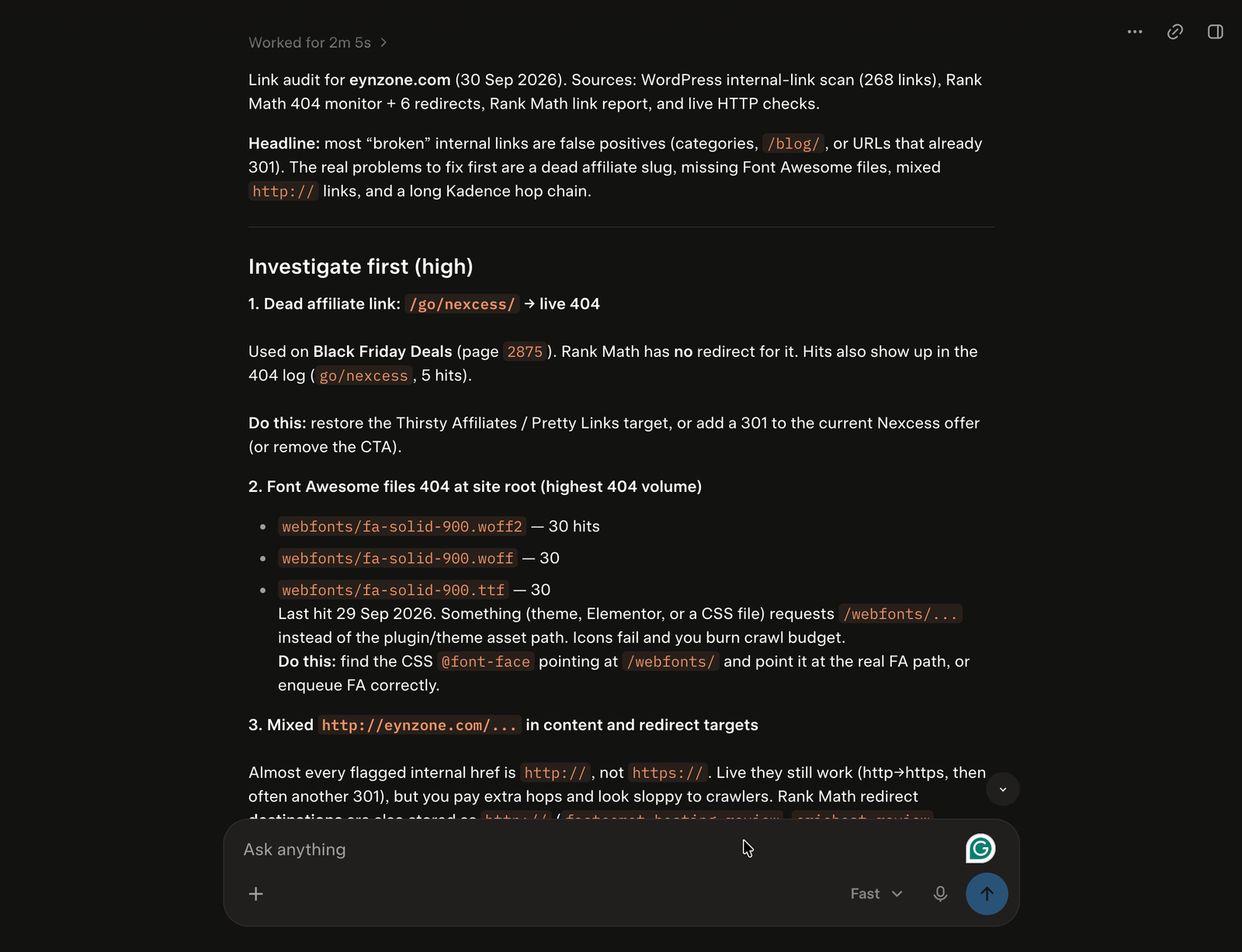
a). A real broken affiliate URL
/go/nexcess/ returned a live 404.
It was being used on the Black Friday Deals page and had five recorded hits.
That is a real issue.
The possible solutions are straightforward:
- restore the affiliate target
- redirect it to the current relevant offer
- or remove the CTA if the offer is no longer relevant
This is exactly the sort of investigation where AI saves time.
b). Font Awesome files were genuinely returning 404s
Three Font Awesome files were being requested from the site root:
- fa-solid-900.woff2
- fa-solid-900.woff
- fa-solid-900.ttf
Each had around 30 hits in the later audit.
This isn’t primarily an SEO ranking issue.
It’s a website implementation issue.
This is also why I don’t look at technical SEO in isolation. Website performance and implementation issues can matter too, which is something I have covered in my guide on how to speed up WordPress.
And that’s an important distinction.
An AI SEO audit may surface something because it is technically wrong, but that doesn’t automatically make it an SEO priority.
My conclusion was:
Fix the broken asset path because it is a real site problem, but don’t pretend it is a direct ranking lever.
That distinction matters.
c). Mixed HTTP and HTTPS URLs
Almost every flagged internal URL used https://eynzone.com/… instead of HTTPS.
The live site still resolved, but the URLs could introduce unnecessary redirects.
The same pattern appeared in several Rank Math redirect destinations.
This was a useful cleanup opportunity.
d). A long Kadence redirect chain
/go/kadence-wp/ was linked from the Home and Resources pages.
Rank Math redirected it to /go/kadence/, which then required several more hops before reaching the final destination.
The live path was around 4–5 hops.
In this case, the better fix is not necessarily to create another redirect.
It is to update the existing on-page links so they point to the current URL directly.
Again, AI found the technical path.
My experience tells me what the cleaner implementation should be.
e). Most 404s were noise
This was perhaps one of the most valuable lessons.
The site had many 404 requests for things such as:
- phpinfo.php
- .ssh/id_rsa
- .aws/credentials
- backup files
- plugin ZIP files
- GraphQL paths
- random Semrush-style URLs
These were clearly different from genuine broken internal links.
I would not redirect these URLs.
They should continue returning 404.
An automated system that treated every 404 as something to “fix” could create a horrible redirect mess.
Test #6: I Asked AI to Audit My Rank Math Settings
Next, I asked:
Review my current Rank Math configuration. Identify settings that appear inconsistent, outdated, or worth reviewing. Don’t change anything yet.
This was where MCP became particularly interesting.
Instead of looking at one report, the AI could inspect relationships between:
- site identity
- homepage SEO
- Schema defaults
- sitemap settings
- redirects
- modules
- Google connections
- social settings
- content types
And it found a lot.
But again, I didn’t treat every finding as something that needed immediate fixing.
My site identity had drifted
The settings audit found multiple names in use:
- EYNZone
- EYNZone InfoBlog!
- EYNWorld
- EYNWorld.com
The Knowledge Graph configuration was also using a Person entity while the configured name looked like a brand.
The entity URL was still using HTTP.
The homepage title and Facebook title still referenced the older EYNWorld branding.
This was a genuine configuration cleanup opportunity.
But notice what happened here.
AI didn’t discover some secret SEO trick.
It discovered my own historical mess.
That’s exactly where an AI audit can be useful.
It can spot inconsistencies that humans stop noticing because we’ve seen them too many times.
Google Search Console connection was stale
The audit also found that the Google connection had an expired refresh token.
URL Inspection was disabled.
That matters because an SEO dashboard is only as useful as the data connection behind it.
If the connection isn’t healthy, I don’t want to make strategic decisions based on assumptions about what the dashboard is showing me.
Some other settings deserved review
The audit also flagged:
- page defaults using Article Schema
- several unused Rank Math modules
- HTTP URLs in some settings
- old sitemap configuration remnants
- llms.txt configuration
- outdated homepage/social metadata
- a Facebook secret value stored in the wrong field
The last one is especially important.
The audit identified a value in a sensitive field that did not appear to match the expected Facebook App Secret format.
I am deliberately not reproducing the value.
That was a useful security/configuration finding, but it is also a good example of why I would never give an AI unrestricted permission to change settings across an entire website.
I have also tested Rank Math settings on specific WordPress setups before, including changing category URLs with Rank Math. The MCP experiment made it easier to look at these settings from a wider site-level perspective.
Test #7: I Tried to Test Rank Math AI Visibility
This is where the experiment did not produce the result I expected.
And I think that is worth including.
I asked AI to analyse Rank Math AI Visibility data and identify:
- queries where my brand appeared
- queries where competitors appeared
- citations
- mentions
- content gaps
But there was no usable AI Visibility dataset for EYNZone.
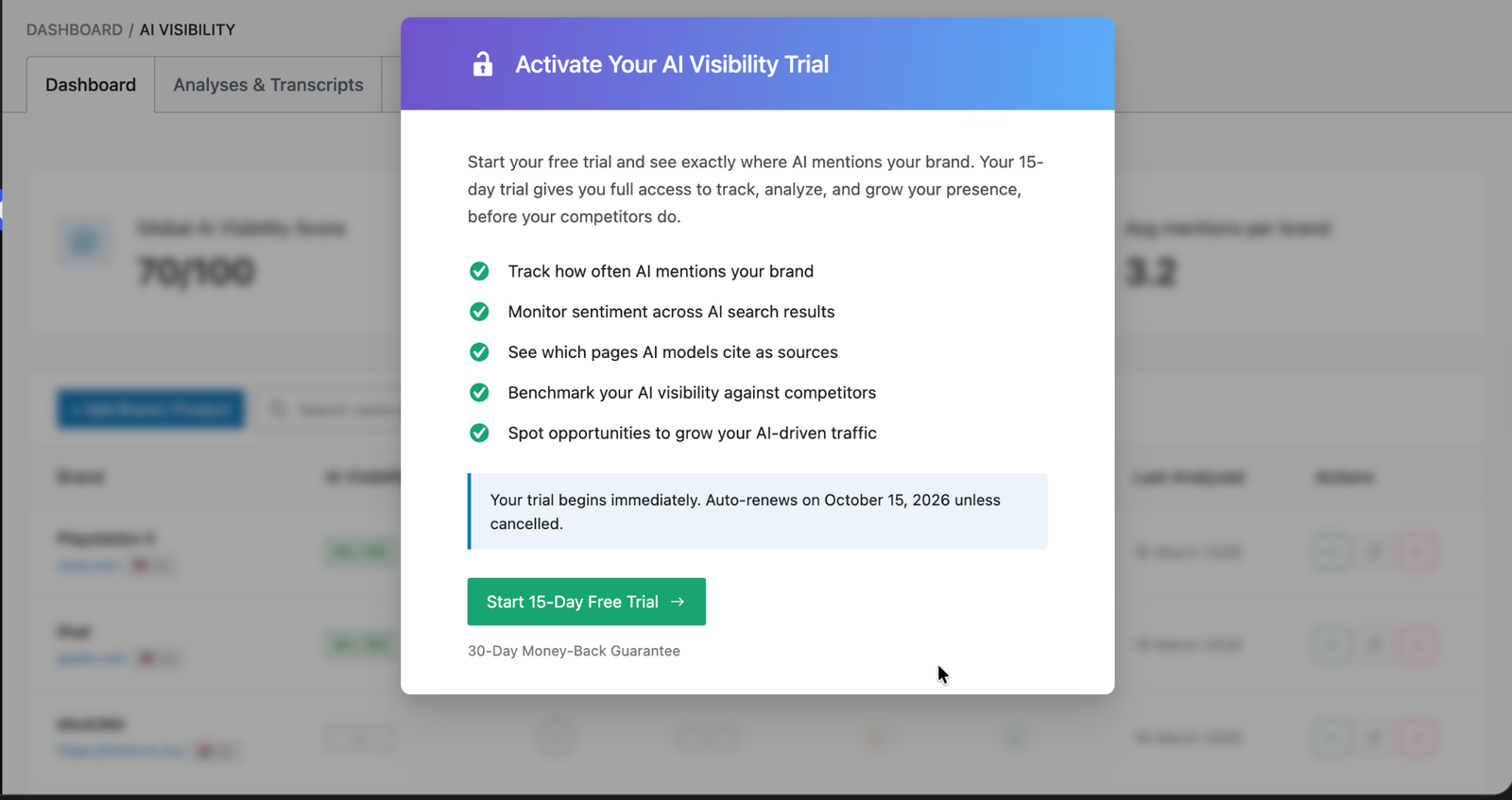
The available data returned an empty overview.
The brand endpoint indicated that the current plan did not include AI Visibility and required a higher tier.
There were also:
- no tracked queries
- no mentions
- no citation data
- no competitor rows
So I could not honestly write:
AI Visibility showed that EYNZone is losing to these competitors.
The data wasn’t there.
And I’m glad I checked.
This is one of the most important differences between an AI-generated article and an experiment-based article:
If the experiment doesn’t produce the result, the result is still part of the experiment.
So instead of inventing a conclusion, I recorded the limitation.
What AI Actually Found vs What I Found
After going through all seven tests, I noticed an interesting pattern.
AI was very good at finding things.
But my value as the SEO practitioner was in deciding what those things actually meant.
For example:
| AI found | My intervention |
|---|---|
| 33 pages missing Schema in Rank Math audit | Investigate why live pages still output Schema before changing anything |
| EricHost ranking around position 7 with 0 clicks | Treat it as a SERP/snippet investigation, not automatically a ranking problem |
| 2,308 impressions for Black Friday page | Connect the data to its stale 2023 title and internal-link opportunities |
| Around half of pages with no inbound links | Cross-reference orphaned pages with search demand |
| 404 requests | Separate genuine broken URLs from bot noise |
| Long Kadence redirect chain | Update source links instead of blindly adding another redirect |
| Conflicting Schema | Verify what is actually generated before editing templates |
| EYNWorld/EYNZone naming inconsistencies | Apply knowledge of the site’s branding history |
| Empty AI Visibility dataset | Report that the test could not be performed |
This is where my opinion about AI-assisted SEO changed.
AI Got Things Wrong Too
I don’t mean that every AI recommendation was technically wrong.
The bigger problem was context.
AI can see a problem without understanding its history.
For example:
A page has low traffic
That doesn’t automatically mean the page needs optimisation.
It could be:
- seasonal
- intentionally narrow
- targeting low-volume queries
- affected by changing search intent
- competing against a stronger SERP
- valuable for reasons that Search Console doesn’t show
A page has no internal links
That doesn’t automatically mean I should add five links.
The right question is:
Where would a reader naturally want to go next?
A page is missing Schema
That doesn’t mean I should add every Schema type available.
Schema should describe the content accurately.
A URL returns 404
That doesn’t mean I should create a redirect.
Some 404s are supposed to be 404s.
My own test made this especially obvious because many of the site’s 404 requests were simply bots looking for files that don’t exist.
The Most Important Lesson: AI Is Better at Finding Than Deciding
If I had to reduce the entire experiment to one sentence, it would be this:
AI is much better at finding things than deciding what everything means.
At least when it comes to SEO.
And I don’t see that as a weakness.
It is actually where the technology becomes useful.
An experienced SEO professional can spend a surprising amount of time collecting information:
- Which pages are affected?
- Which URLs redirect?
- Which pages have no links?
- Which settings are enabled?
- Which Schema is present?
- What does Search Console show?
- Which issues are real?
- Which ones are noise?
If AI can reduce that investigation time, I can spend more time on the part that requires experience:
What should we actually do?
What I Would Let AI Do
After this experiment, I would be comfortable using Rank Math MCP + AI for:
Research
- finding technical SEO issues
- identifying underperforming pages
- finding orphaned content
- reviewing internal-link opportunities
- inspecting redirects
- reviewing 404 data
- checking Schema
- reviewing Rank Math settings
- analysing available Search Console data
Analysis
I would also let AI:
- group problems by severity
- compare pages
- identify patterns
- cross-reference different datasets
- explain why something might matter
- prepare a prioritised SEO task list
Execution
For lower-risk changes, I can see value in allowing AI to execute changes I explicitly approve.
But I would keep a confirmation step for anything with broad consequences.
What I Would NOT Let AI Change Without Review
There are some things where I still want to be the person pressing the final button.
Especially:
- deleting content
- mass redirects
- canonical URLs
- index/noindex settings
- robots directives
- URL structures
- major Schema changes
- removing internal links at scale
- sitewide SEO settings
- major content strategy decisions
The better AI becomes at taking action, the more important human verification becomes.
My New SEO Workflow
Before this experiment, my workflow looked roughly like:
Find problem → investigate → open WordPress → inspect Rank Math → research → fix → verify
With MCP, I can move much of the investigation into one conversation. For example, I can connect this workflow with my Rank Math free workflow and use AI to investigate issues before I make changes.
Ask → inspect → analyse → prioritise → review → approve → execute → verify
That is the real improvement for me.
Not “AI replaces SEO.”
Not “AI does everything.”
Instead:
AI reduces the distance between noticing a possible problem and understanding what deserves my attention.
That’s much more useful.
It also fits with how I already approach on-page SEO optimization. I still want to understand why something needs to be changed before making the change.
The difference is that MCP can help me get to that understanding much faster.
10 Rank Math MCP Prompts I Would Actually Use
If you’re experimenting with Rank Math MCP yourself, I would start with prompts like these.
1. Audit the site
Audit my website’s SEO using Rank Math MCP. Do not change anything. Group the findings by severity and explain why each issue matters.
2. Find underperforming content
Review my available Search Console data and identify pages with meaningful impressions but weak click-through or ranking performance. Explain why each page deserves investigation.
3. Find orphaned content
Audit my internal links and identify important pages with zero or very few inbound internal links. Cross-reference them with available performance data.
4. Review Schema
Review the Schema attached to my important posts. Identify anything that appears inconsistent, irrelevant, duplicated or worth investigating. Do not make changes.
5. Audit redirects
Review my redirects and identify unnecessary chains, outdated destinations, or redirects that deserve investigation. Don’t change anything.
6. Investigate 404s
Analyse my 404 data and separate genuine broken URLs from likely bot or scanner noise. Show me which URLs deserve investigation first.
7. Review sitemap configuration
Review my Rank Math sitemap configuration and explain anything inconsistent or worth investigating. Do not make changes.
8. Review SEO metadata
Find important pages with missing or outdated SEO titles and meta descriptions. Prioritise them using available search performance data.
9. Check AI Visibility
Analyse my Rank Math AI Visibility data. If the dataset is unavailable or empty, tell me that instead of making assumptions.
10. Before making any change
Before changing anything, show me the current value, your proposed change, why you recommend it, what evidence supports it, and the possible downside. Wait for my approval.
That last prompt is probably the one I will keep using.
What Changed My Mind About Rank Math MCP
I started this experiment thinking the interesting part would be automation.
I thought:
Can I get AI to do SEO work for me?
After actually testing it, I think that’s the wrong question.
The more interesting question is:
Can AI understand the context of my website well enough to help me make better SEO decisions?
And the answer from my experiment is:
Yes, to a point.
Rank Math provides the SEO data.
WordPress provides the actual website context.
MCP connects that information to the AI assistant.
And I provide the final judgment.
That creates a very different workflow from generic AI SEO advice.
Instead of:
Here are 20 things you should do for SEO.
I can ask:
Here is my website. What is actually happening?
That is much more useful.
My biggest takeaway from this Rank Math MCP experiment was simple: AI is very good at finding problems, but I still want to make the final SEO decisions myself.
My Final Take
I don’t think Rank Math MCP makes an SEO professional unnecessary.
I think it makes the investigation part of SEO much faster.
For this experiment, I used AcrossAI’s MCP Manager and Abilities Manager with the Pro version. It made it easier to manage the default Rank Math MCP setup and connect additional abilities to the workflow without manually managing every capability separately.
That setup is what made this experiment practical for me. I could start with the pre-built Rank Math abilities and then use additional abilities when I needed to investigate something beyond a single SEO report.
During this experiment, AI helped me uncover:
- missing SEO metadata
- Schema inconsistencies
- orphaned pages
- search performance opportunities
- broken affiliate URLs
- Font Awesome 404s
- redirect chains
- HTTP/HTTPS inconsistencies
- outdated branding
- stale Rank Math connections
- configuration issues I had overlooked
But the most valuable part wasn’t the number of issues it found.
It was being able to connect different pieces of information.
For example:
EricHost → position 7 → 228 impressions → 0 clicks → 0 inbound internal links
is much more useful than:
EricHost needs SEO optimisation.
And:
Black Friday page → 2,308 impressions → position 50 → old 2023 title → potential internal-link hub
Gives me a much clearer starting point than a generic SEO score.
That’s where I see the real potential of this workflow.
My rule after this experiment
- Let AI investigate.
- Let AI explain.
- Let AI connect the data.
- Let AI recommend.
- Let AI execute approved changes.
But always verify.
Because SEO isn’t just about finding problems.
It’s about knowing which problems matter, why they matter, and what should happen next.
And after testing Rank Math MCP on my own WordPress website using AcrossAI MCP Manager with the pre-built Rank Math abilities, that’s the part I still want to own.
AI can give me the evidence. My job is to make the SEO decision.